TradingDiary Pro
The fully automated trading journal
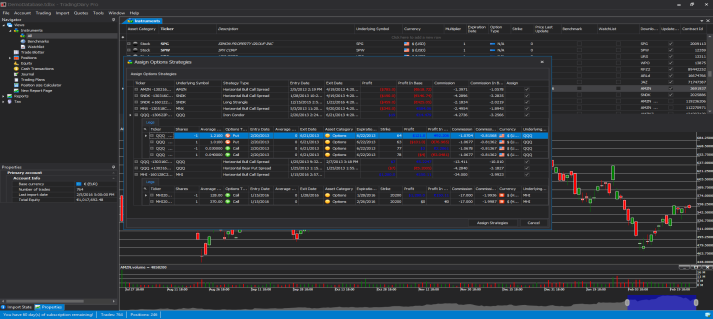
Options strategy support
More than 25 supported options
strategies

Trading journal software for stocks, options, futures and forex

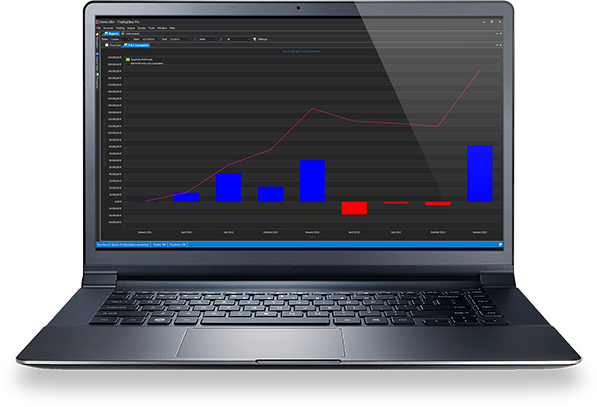
TradingDiary Pro is a trading journal and performance analysis application for active traders, developed by Sword Tech Kft. since 2009. It imports your trades automatically from 30+ brokers, groups option legs into strategies, and produces performance, risk, net asset value and country-specific tax reports for stocks, options, futures, forex, CFDs and bonds.

Keep a trading journal

Save time and make more money!

Keeping a trading journal prevents you from trading randomly and impulsively, and losing a huge amount of money. In turn, it makes you a much more successful trader.

Forget the trading journal templates, sheets and trade logs you spent weeks building and then need to fill in on a daily basis!

TradingDiary Pro is a user-friendly trading performance recorder with one-click import support, a wide range of configurations, useful statistics and practical reports. The clear visual charts will help you to understand the true human nature of trading, avoid repeatedly making the same mistake, and control your behavior.

Give yourself the chance to improve your performance, and become as good as you have always dreamt you would be.

Develop the right strategy

Control your trading performance!

Develop a winning strategy!

Are you an active trader who makes a number of decisions and runs a number of trades each day? Then TradingDiary Pro will help you to easily record and retrieve past and present performance statistics.

Recording your transactions is just as important as examining the history of stock before entering a trade.

Why is it essential? The idea is to keep a record of why you entered or exited a specific trade, what the circumstances were, and whether your decision was correct or not. Using this information you can then learn from the past.

A trading diary helps you to

* discover correlations
* identify unsuccessful instruments
* recognize bad decisions
* analyze the loss/gain points
* maintain successful tactics
* improve your strategy

Knowledge is power. A trading journal allows you to review your mistakes and successes. TradingDiary Pro will be your coach in your quest to develop a winning strategy and become a better trader.

Control yourself

Get acquainted with your habits!

Review your trading practice. Monitor your decision making patterns and control your emotions.

Have you ever reviewed a past trade and wondered what happened? None of the technical analysis software, stock news sites or trader seminars can save you the time and effort of self appraisal.

Are you a strategic trader or a fun-loving one? Getting familiar with your habits is essential to success. Record keeping is critical to running an efficient business. A diary can improve your performance far more than you might ever have imagined.

If you have ever made a trading decision in a moment of excitement and you were sure you were making the best deal only to discover it was a huge mistake, then you will like TradingDiary Pro because it helps you to recognize these moments.

A trading journal is used to help you understand why you behaved in a specific manner, and so improve your approach in future. Keeping a journal helps you understand your motivations, and become a better trader.

Check out the features!
Features

Purchase process

Activate the trial version and become a better trader!

Screenshots

See All Screenshots

30 Day Trial

TradingDiary Pro Trial

Before buying the software you can try if it meets all your requirements. The trial version is valid for 30 days and has every feature of the full version except exporting the Capital Gains report.

Simply download the latest version from the Software page and after installation follow the initial wizard or click on the help/start trial menu. Please note that the software periodically communicates with the license servers to validate your trial. After the trial period you can use the software in read only mode which means you cannot modify your TradingDiary Pro database anymore.

If you are satisfied, we would be happy to have you among our clients!

Download now!

Happy Clients

  • Amazing Trading Journal Tool!

    futures.io user
  • I'm very pleased with the product. Very stable, very efficient and powerful.

    G.C. - United States
  • Eventually I have purchased your brilliant trading diary journal. It really is the best out there, for all the detail.
    The online journals are fine for top level stats, but good to have my all my accounts in one place with one set of data and information.

    J.G. - UK
  • I've been using TDP for nearly a year now. I've tried some of the fancy online trading journals, but I keep coming back to the conclusion that TDP is just better than all of them in many respects. Keep going with it, it's a really great tool.

    B.W. - Australia
  • TradingDiary Pro is still the best portfolio management tool out there for swing traders like myself. I’ve tried them all.

    S.C. - United States

Clients Around The World

Latest Articles

Frequently asked questions

Is TradingDiary Pro a one-time purchase or a subscription?

It is a one-time license. You pay $149 once and get the current version plus 1 year of upgrades and e-mail support. After the first year the software keeps working; the optional $49/year subscription only renews upgrades and support. If your subscription lapsed less than 6 months ago you can renew for $49; after that a new license is available at a 50% discount ($74.50). Prices and licensing

Where is my trading data stored?

In the desktop version your trades are stored in a local, single-file database on your own PC – nothing is uploaded to the cloud. Only your PC’s hardware ID is sent to the license server to validate the license. In the web version your data is stored in your own isolated account. Local trading journal

Does TradingDiary Pro work offline?

Yes. The desktop application works without an internet connection. The license is validated periodically; after 5 days without a successful validation the software switches to read-only mode until it can connect again.

Does it run on Mac or Linux?

The desktop application runs on Windows 10 and 11. The browser-based web version (currently in beta) runs on Windows, macOS and Linux; it currently supports Interactive Brokers imports, and further import modules are being ported. Web version

Which brokers can I import trades from?

More than 30, including Interactive Brokers, Charles Schwab, Thinkorswim, Tastytrade, E*Trade, Fidelity, TradeStation, NinjaTrader, MetaTrader 4, OANDA, FXCM, Questrade, Degiro, Rithmic and Sierra Chart, plus generic Excel/CSV import for any other broker. All import modules · Interactive Brokers guide

How does it handle options strategies?

Option legs are grouped automatically into strategies – more than 25 types are recognized, from verticals and straddles to iron condors – with a combined profit and loss. You can also assign legs manually, break up a strategy, or record adjustments and rolls. Options trading journal

Can TradingDiary Pro create tax reports?

Yes. It produces a capital gains report and country-specific tax reports for the United States, Germany, Canada and Australia, calculated from your imported trades.

What is included in the free trial?

The 30-day trial has every feature of the full version except the capital gains export, and the tax report is limited to 100 rows. No e-mail address is required. After the trial the software stays usable in read-only mode, so you keep access to your data. Start the free trial

How many PCs and trading accounts does one license cover?

One license can be activated on two PCs, for example a desktop and a laptop. There is no limit on the number of trading accounts, databases or trades.

Can I use TradingDiary Pro with Claude or other AI assistants?

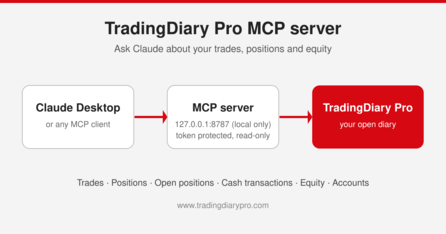
Yes. From version 26.2 TradingDiary Pro has a built-in MCP (Model Context Protocol) server, so Claude Desktop, Claude Code and other MCP clients can read the trades, positions and equity of the diary you have open and answer questions about your own trading. The server is local-only, read-only and token protected. MCP server guide